Transactions
✔️ Payments Users
The Transactions section in the unTill Payments portal provides a complete overview of all payment transactions processed at your location using unTill Payments. This section is designed to help you track, verify, and analyze each payment operation in real time or historically.
Transaction details
For every transaction, you can view:
- Date & Time – When the transaction took place.
- PSP Reference – The unique identifier generated by the Payment Service Provider.
- Bill - The original purchase amount before tips.
- Tips - The tip amount added to the transaction.
- Total Amount – The total payment amount.
- Payment Method – The method used (e.g., Mastercard, Visa).
- Card type - Indicates whether the card is debit, credit, or prepaid. If no value is available, it is displayed as Unspecified.
- Status – The current outcome of the transaction
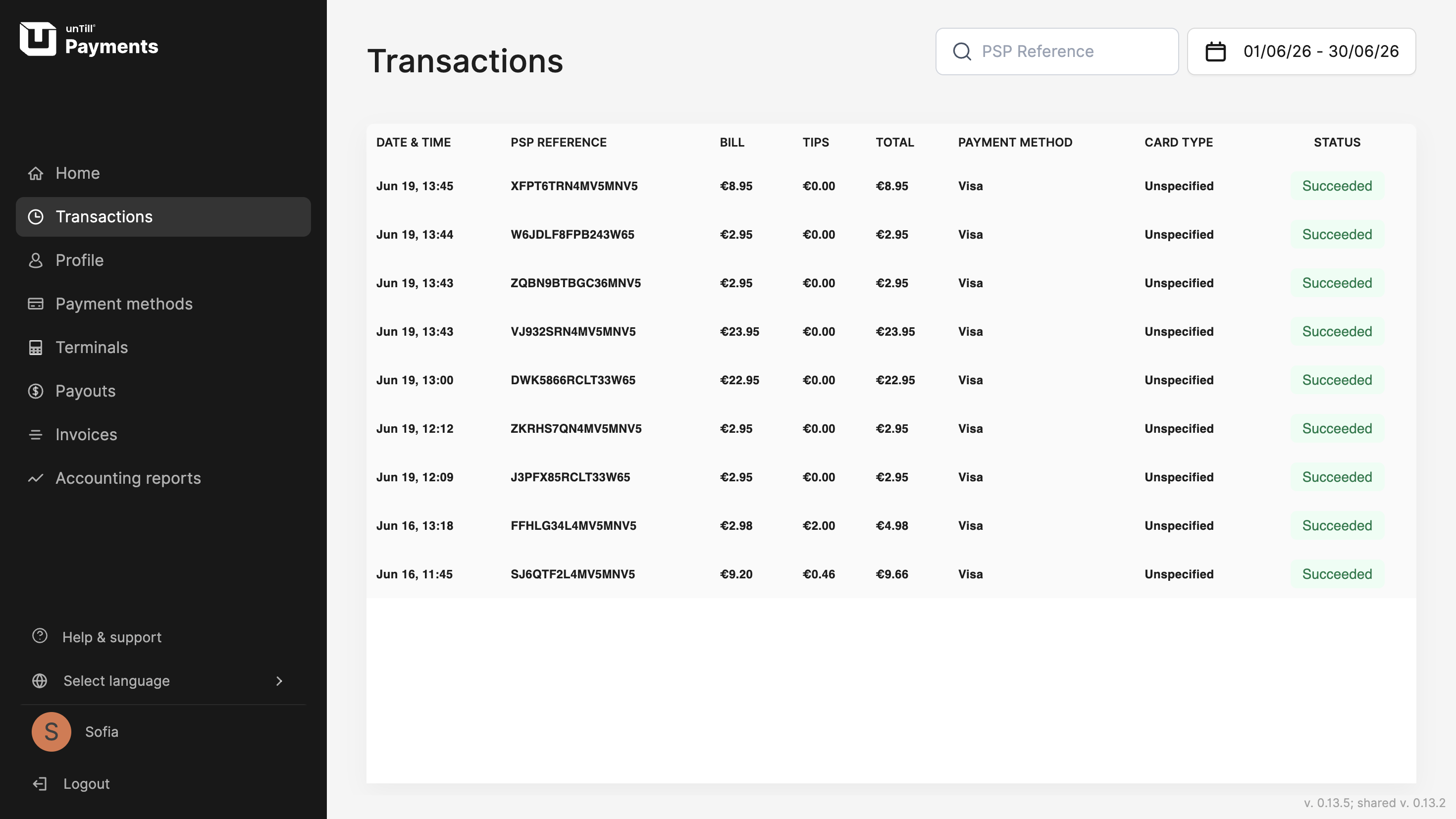
Locate specific transactions
You can also narrow down and sort transaction records by selecting a specific day or defining a time period to review all payments that occurred during that timeframe. To do this, use the calendar feature located in the top-right corner.
Another quick way to find a specific transaction is by searching for its PSP Reference ID directly.
These filters help you locate transactions faster, whether you're handling accounting queries, reconciling payments, or investigating discrepancies.